


Why This Seedance 2.0 AI Guide is a Game-Changer
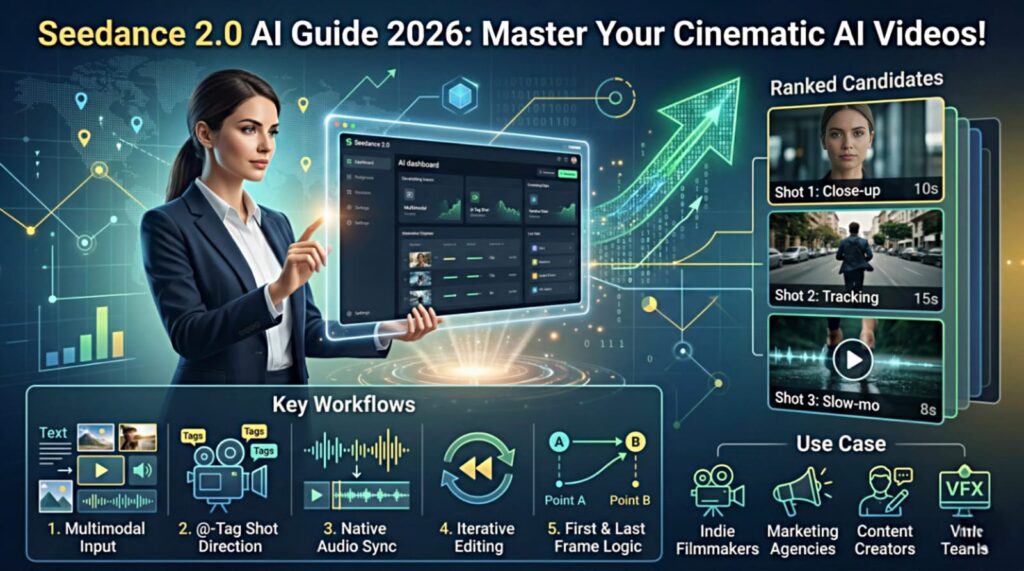
Seedance 2.0 AI Guide is the most essential resource for creators looking to move beyond simple prompts and start directing cinematic masterpieces in 2026. Developed by ByteDance, Seedance 2.0 has introduced a massive shift in how we generate high-fidelity video. It is the world’s first truly multimodal video engine, allowing you to use a mix of text, images, and audio as precise “Directing Cues”.
At Aivora, we’ve analyzed the engine’s capabilities. In this comprehensive Seedance 2.0 AI Guide, we will walk you through every step to master this “Multimodal Director” for professional-grade results.
What is the Seedance 2.0 AI Engine?
Before starting our Seedance 2.0 AI Guide tutorial, it’s important to understand the architecture. This model uses a Quad-Modal Input system that can process up to 12 different assets at once.
-
Text Prompts: Your core creative direction.
-
Images: Up to 9 reference photos for style and character.
-
Video Clips: Up to 3 references to guide motion.
-
Audio: Up to 3 tracks for rhythm and native sync.
Step-by-Step: How to Use the Seedance 2.0 AI Guide Workflow
1. Mastering the @-Tag Shot Direction
The most powerful tool in this Seedance 2.0 AI Guide is the @ tag system. You can assign specific instructions to your uploaded files directly in the prompt.
-
Example: “A shot of @CharacterPhoto1 laughing, using the camera movement from @VideoClip1.”. This ensures the AI uses your exact references rather than generating random content.
2. Using Native Audio-Visual Synchronization
As we highlight in this Seedance 2.0 AI Guide, the model generates video and audio together in one pass. This means sound effects like footsteps or background ambience are perfectly timed with the visual movement without extra editing.
3. Fine-Tuning Motion and Duration
You can generate clips between 4 and 15 seconds. In the “Video Motion” settings, you can define intensity—from a subtle zoom to a high-speed action sequence.While Seedance 2.0 handles the visual directing perfectly, managing a full content pipeline requires smart automation. For that, we highly recommend integrating open-source agents into your daily setup. You can find the perfect tools in our latest [AI Agents Guide: 36 Best Free MIT Tools You Must Try in 2026].
Advanced Pro Tips for the Seedance 2.0 AI Guide
First & Last Frame Logic
To create a logical narrative, this Seedance 2.0 AI Guide recommends using the “First & Last Frame” mode. Upload one image as the start and another as the end; the AI will intelligently fill the gap with smooth, physics-defying motion.
Iterative Editing and Extensions
Don’t restart if a shot isn’t perfect. Use the “Extend” tool to add 5 more seconds to a promising take or “Regenerate” to refine specific details like lighting or character expressions while keeping the core composition.
Who Benefits from This Seedance 2.0 AI Guide?
-
Indie Filmmakers: Block out shots and create high-quality previsualization (previz).
-
Marketing Agencies: Produce short social hooks and ads with high commercial value.
-
Content Creators: Generate stylized B-roll for YouTube, TikTok, and Instagram.
-
VFX Teams: Rapidly test motion physics and cinematic ideas.
Pros and Cons: A Balanced Seedance 2.0 AI Guide Evaluation
The Pros:
-
Total Creative Control: @-tagging eliminates “AI randomness”.
-
Production Quality: No watermarks on paid generations and native commercial licenses.
-
High Efficiency: Render times are often under 5 seconds for rapid ideation.
The Cons:
-
Complexity: It feels like a professional toolkit, not a casual “one-button” toy.
-
Credit Based: Usage is tied to a credit system, which can add up for heavy users.
Final Verdict on the Seedance 2.0 AI Guide
To conclude our Seedance 2.0 AI Guide, this engine is the gold standard for creators who want to direct their AI video content with intent. By following this tutorial, you can produce cinematic work that rivals traditional production houses in 2026. For more professional insights, check our Higgsfield.ai Review to see how these models integrate.
Conclusion: Is Seedance 2.0 the Best AI Model?
To conclude our Seedance 2.0 AI Guide, this model is a masterpiece for creators who want to direct rather than just generate. Its ability to process multiple references and generate synced audio makes it a top-tier tool for 2026. If you care about consistency, creative intent, and professional workflows, Seedance 2.0 is the foundational engine you need for your studio.