


Quick Answer :
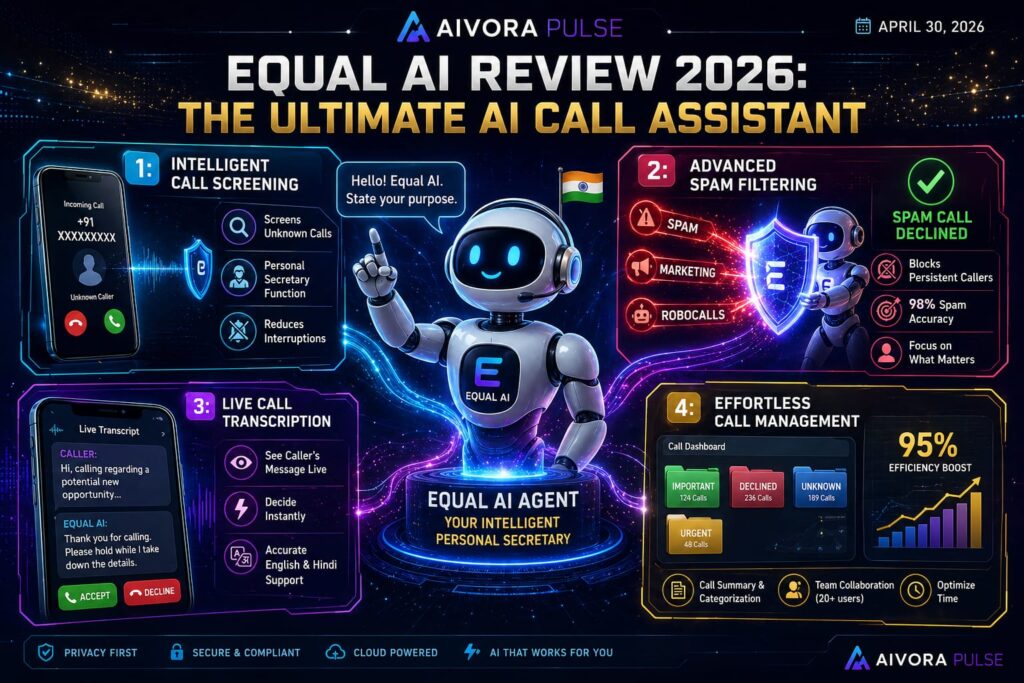
The Equal AI Assistant is an advanced mobile application that actively answers calls from unknown numbers on your behalf. To set it up, simply download the app from the Play Store, verify your number via OTP, select your preferred AI voice and regional language (like Hindi or English), and activate it on your SIM. Once live, the AI screens incoming calls, provides a real-time text transcript of the caller’s intent, and automatically disconnects recognized spam or telemarketing calls.With smart tools like Equal AI Assistant, managing your digital life has never been easier. But the AI revolution doesn’t stop at just blocking spam. Major companies are releasing mind-blowing updates every single week. To see what the biggest players just dropped, read our full coverage on the [16 Incredible AI Updates: Free GLM 5.2 vs Claude Fable 5].
1. How the Smart Call Interception Works
Unlike traditional caller ID apps that merely warn you about potential spam, this application functions as a proactive digital secretary. When an unknown number dials your phone, the application intercepts the call before it rings loudly. The AI politely greets the caller and asks for their name and the exact reason for calling.
As the caller speaks, their audio is instantly transcribed into a live text pop-up on your screen. If the system detects a telemarketer or a promotional pitch, it instantly cuts the call. If the call is genuine (like a client or a delivery executive), you can choose to take over the conversation seamlessly.
2. Key Features: Live Transcripts & Spam Blocking
Live Call Transcription
The most brilliant feature of this platform is the live transcript. When the AI answers a call, whatever the caller says is instantly converted into text and displayed on your screen in real-time. You can read this live transcript and decide whether to “Accept” or “Decline” the call on the spot. This feature is pure magic during deep-work sessions or important client meetings.
Advanced Spam and Telemarketing Filter
Unlike traditional applications that occasionally let promotional calls slip through, Equal AI uses advanced Natural Language Processing (NLP) to understand the caller’s true intent. If the caller starts pitching credit cards, loans, or promotional offers, the system automatically disconnects the call and sends you a silent notification.
Regional Language & Accent Support
Because telemarketers globally use various regional dialects, Equal AI is trained to understand not just standard English, but also diverse accents, including complex Indian accents and Hindi terminology. This ensures you always receive an accurate context of the interaction.
3. Equal AI Assistant Setup Guide
Configuring this application on your smartphone takes less than two minutes. Follow these precise steps to activate your digital secretary:
-
Step 1: Download & Initialize: Open the Google Play Store, search for the application, and install it. Upon opening, tap the “Setup My Assistant” button at the bottom of the screen.
-
Step 2: Number Verification: Enter your active mobile number and tap “Send OTP”. The app will automatically detect the OTP. Click “Verify” to proceed.
-
Step 3: Profile Creation: Enter your full name and select your gender. Click “Next”.
-
Step 4: Language Selection: Choose your Assistant Language and Primary Language. You can select multiple regional options (like Hindi, Bengali, or English) so the AI knows which language to prioritize when answering a call.
-
Step 5: Voice Customization: The system provides multiple AI voice profiles (both male and female). You can listen to a short preview (e.g., “Hello, I am your personal assistant”) to see how it sounds. Select your preferred voice and tap “Confirm”.
-
Step 6: SIM Activation: Choose the specific SIM card you want the AI to monitor and click “Activate on this SIM”.
4. Pros and Cons: A Balanced Perspective
To provide a complete evaluation, here is how the platform performs in real-world scenarios:
The Pros:
-
Unmatched Mental Peace: Completely eliminates the anxiety associated with answering unknown numbers.
-
Saves Hours Weekly: Reclaims the time previously wasted on fake calls and persistent telemarketers.
-
Privacy-Focused: Call recordings and transcripts are processed securely and are never sold to third-party data brokers.
The Cons:
-
Robotic Impression: Some genuine callers, like delivery executives or prospective new clients, might get confused by the AI’s automated voice and hang up prematurely.
-
Internet Dependency: The live text transcription feature requires an active mobile data or Wi-Fi connection to function properly.
5. Who Should Use Equal AI?
This tool is highly versatile and fits perfectly into the modern digital workflow of:
-
Independent Creators & Webmasters: Individuals managing an entire business solo who cannot afford constant interruptions.
-
Freelancers & Consultants: Professionals needing a reliable filter between prospective new clients and aggressive spam.
-
Small Business Owners: Founders who have listed their personal numbers in public business directories and need an automated shield.
6. Advanced Call Controls: Live Transcripts & Takeovers
Once the setup is complete, the true power of this Equal AI Call Assistant comes into play during live interactions.
When an unknown number calls, a detailed pop-up appears on your screen summarizing the caller’s intent (e.g., “Rajesh is calling regarding a pending payment”). From this live dashboard, you have three powerful options:
-
Custom Prompts: You can type a text message directly into the app (e.g., “Tell them I am busy right now”). The AI will read your text out loud to the caller in real-time.
-
Instant Takeover: If you realize the call is important, simply tap the “Take Over” button. The AI will gracefully exit, and the call will immediately route to your earpiece.
-
Auto-Disconnect: If the live transcript reveals it is a spammer, you can let the AI handle it or manually hit the disconnect button without ever speaking a word.
Rajan Gupta’s Verdict: My Personal Testing Notes
After setting this up and routing my incoming business calls through the system, I can confidently say this is one of the most practical productivity tools I have ever used.
My Take: I personally tested this application by calling my own device from a different number. The way the AI picks up, asks for the purpose of the call, extracts all the necessary details, and displays them on my screen is incredibly accurate. It acts exactly like a real human assistant. Furthermore, its ability to automatically cut off aggressive spam calls before they break my focus is a lifesaver. For anyone overwhelmed by telemarketers, installing the Equal AI Assistant is an absolute no-brainer.
“While Equal AI manages your phone calls and protects your focus, if you need an assistant to streamline your coding, email writing, and web browsing tasks, check out our comprehensive [Monica AI Review].”
“To understand the core technology behind real-time speech processing, you can read more about Natural Language Processing on Wikipedia.”