


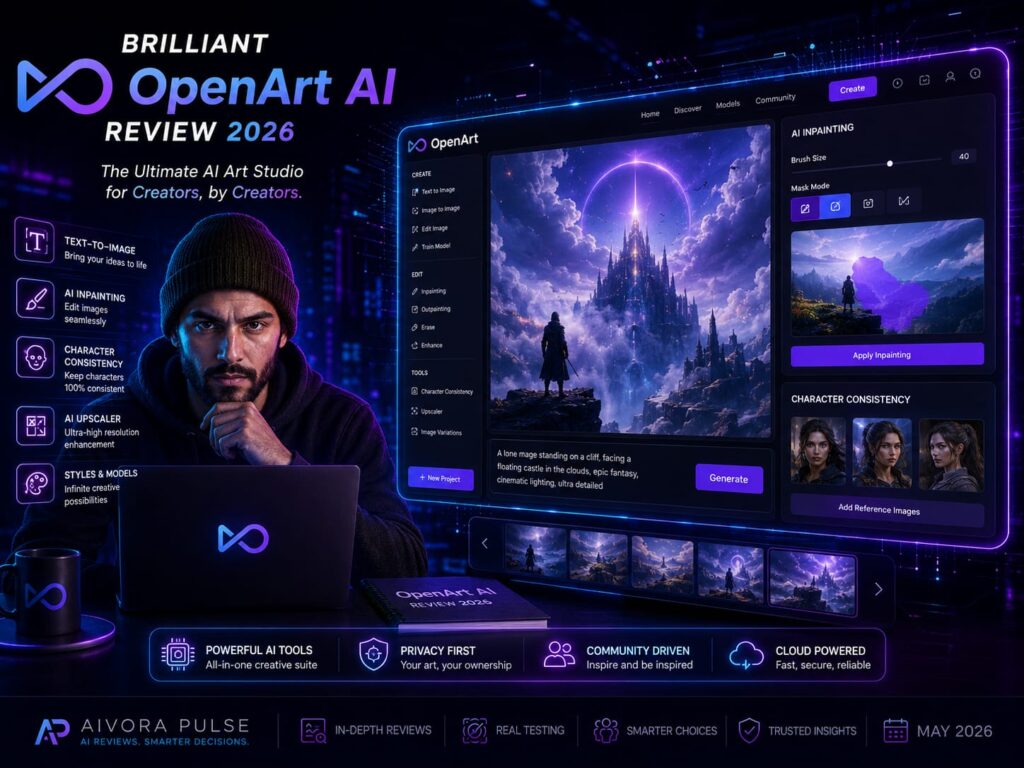
The search for the absolute best OpenArt AI guide ends here. In 2026, the frustration of generating an image in Midjourney, exporting it, and then taking it into Photoshop to fix small errors is officially over. Whether you are a digital marketer, a comic book artist, or an agency creative, OpenArt AI is the ultimate platform to consolidate your entire visual workflow. This comprehensive review explores how this browser-based powerhouse combines top-tier generative models, built-in editing suites, and advanced character consistency tools into one seamless dashboard.
At Aivora Pulse, we evaluate generative tools that prioritize creative control over random outputs. Our deep dive reveals that OpenArt AI is a brilliant, indispensable asset for professionals who want to move beyond simple prompts and actually direct their visual storytelling without jumping between multiple expensive software subscriptions.
What is OpenArt AI?
OpenArt AI is an advanced, all-in-one generative AI studio that allows users to create, edit, and animate visual content directly in their browser. Unlike traditional generators, it offers built-in tools like inpainting, outpainting, and AI video generation alongside its core image models. Its standout feature is Character 2.0, which generates highly consistent characters across multiple scenes using just a single reference image. It is the premier choice for marketers, storytellers, and designers seeking complete workflow control without needing complex local installations or Discord interfaces.
1. Key Features: The Complete Creative Workspace
To dominate digital storytelling in 2026, you need granular control over your assets. According to our OpenArt AI review, here is what makes this platform a true all-in-one studio:
-
Consistent Characters: The hardest part of generative art is keeping a character looking the same in different scenes. The Character 2.0 tool solves this, requiring only one reference photo to generate the same face and body across dozens of new prompts.
-
Built-in Editing Suite: If the AI generates a perfect image but messes up a hand, you don’t need Photoshop. You can use the native Inpainting tool to highlight and regenerate just that specific area.
-
Multiple AI Models: Instead of being locked into one aesthetic, you can switch between Stable Diffusion, SDXL, and specialized anime or photorealistic models with a single click.
-
Sketch to Image: You can draw a rough, simple doodle on the canvas, and the AI will instantly render it into a polished, high-fidelity masterpiece.
OpenArt AI Review 2026: Fixing the Midjourney Problem
As highlighted in our evaluation, the biggest friction point with standard generators like Midjourney is the lack of a proper UI and editing capabilities. For an independent creator managing a fast-paced content schedule, generating an asset is only step one. OpenArt AI completely bridges this gap. By keeping your entire workflow within one unified browser interface, you maintain perfect context. You can generate a base image, expand its borders (outpainting) for a YouTube thumbnail, fix minor glitches, and even animate it into a short video clip—all without downloading a single file or paying for external editing software.
Pros and Cons: A Balanced Perspective
The Pros:
-
Unmatched Workflow: Combines generation, LoRA training, and pixel-level editing in one clean interface.
-
Storytelling Capabilities: The character consistency tools are industry-leading for comic creators and advertisers.
-
Beginner Friendly: No need to learn complicated Discord bot commands or install Python environments.
The Cons:
-
Credit Consumption: Advanced features like high-quality generation, inpainting, and video creation burn through monthly credits very quickly on lower-tier plans.
-
No Credit Rollover: Unused credits at the end of the month do not roll over to the next billing cycle.
Who Should Use OpenArt AI?
OpenArt AI is perfectly tailored for:
-
Digital Marketers: Creating highly specific ad creatives, banners, and social media graphics quickly.
-
Storytellers & Comic Artists: Leveraging the character consistency tools to build cohesive graphic novels.
-
Solo Entrepreneurs: Needing professional product mockups and marketing assets without hiring an entire design team.
-
UI/UX Designers: Using the sketch-to-image feature to turn wireframes into high-fidelity web concepts.
OpenArt AI Pricing Details 2026
Bhai, inka pricing credit-based hai, jo usage ke hisaab se scale hota hai. Annual billing par inka 50% discount kaafi aggressive hai:
| Plan | Price (Annual Avg) | Best For |
| Free | $0 | Casual testing (provides a small pool of one-time trial credits). |
| Essential | ~$7.00 / month | Beginners needing standard image generation (approx. 4,000 credits/mo). |
| Advanced | ~$14.50 / month | Active creators needing advanced editing and higher generation speeds. |
| Infinite / Pro | ~$28.00 / month | Power users and agencies requiring video generation, massive credit pools, and parallel processing. |
Disclaimer: AI platform pricing and credit structures evolve constantly. Always refer directly to the official platform for the most accurate current pricing.
Final Verdict: Your New Digital Studio
To conclude this OpenArt AI review, this platform provides the most seamless way to actually direct generative art in 2026, rather than just rolling the dice with prompts. With an Overall Score of 4.8/5 and unmatched built-in editing features, it is the standard for creators who value workflow efficiency.
Stop exporting flawed images to other software. Mastering OpenArt AI will centralize your creative process and drastically speed up your production time.
“If you are exploring other platforms to enhance your digital workflow, be sure to read our comprehensive review of [previous article] to discover another powerful tool for your tech stack.”