For the past two years, my daily development workflow heavily relied on standard Visual Studio Code equipped with basic autocomplete extensions. But by late 2026, standard line-by-line autocomplete feels painfully slow. When I recently decided to migrate my Python automation scripts and front-end architectures, I realized I needed a system that doesn’t just predict the next word, but understands my entire codebase and executes multi-file edits autonomously.
This led me down a rabbit hole of testing the two biggest heavyweights in the developer ecosystem right now: Cognition’s Devin and Cursor. If you are struggling to choose the right AI coding assistant for your software team, this Devin vs Cursor breakdown is based entirely on my real-world testing over the past few weeks. Let’s dive into what actually works and what is just marketing hype.
1. My Experience with Cursor AI (The Collaborative Copilot)
Cursor has been the darling of the AI engineering world for a while now, and for good reason. It is built as a deep fork of VS Code, which meant my transition was completely frictionless. I imported my extensions and was ready to code in seconds.
The core of the Devin vs Cursor philosophical divide is autonomy versus control. Cursor operates on a collaboration-based model where you are always at the wheel.
What I Loved About Cursor:
-
The Composer Feature: Hitting
Ctrl+Ito open the Composer felt like magic. I asked it to add a dark mode toggle to my React dashboard, and it automatically edited my CSS, updated the React component, and injected state logic simultaneously across multiple files.

-
Model Flexibility: Cursor lets you easily toggle between Claude 3.5 Sonnet, GPT-4o, and even highly efficient open-weight models like those I discussed in my Mistral Large 3 Review.
-
Continuous Iteration: Cursor is incredibly fast for exploratory work and debugging. You stay inside the editor and watch changes form in real-time.
Where Cursor Frustrated Me:
Because it relies heavily on your active presence, stepping away mid-task often means losing context. It occasionally overwrote chunks of my working code while trying to fix a separate bug, forcing me to aggressively monitor its changes.
2. My Experience with Devin AI (The Autonomous Engineer)
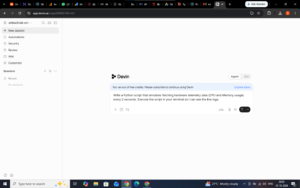
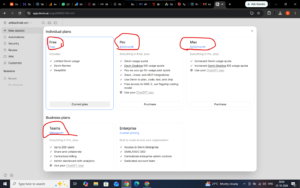
Developed by Cognition Labs, Devin is marketed as the industry’s first fully autonomous AI software engineer. Earlier this year, Devin was famously priced at an inaccessible $500 per month, but the recent 2026 pricing update dropped the entry point to a Free tier and a $20/month Pro plan. As you can see in my attached screenshot where I hit the free credit limit, the platform is now highly accessible to individual developers.
What Stood Out in Devin:
-
True Handoff Execution: While Cursor requires you to think through the code continuously, Devin allows you to hand the work off entirely. I assigned it a task to restructure my backend routing, and it independently spun up its own browser, read error logs, diagnosed issues, and committed the fixes while I stepped away.
-
Enterprise-Grade Problem Solving: In my testing, it handled ambiguous tasks surprisingly well. Backed by its impressive 51.5% resolution rate on the SWE-bench benchmark for real GitHub issues, it acts more like a junior developer than a simple text predictor.
-
Deep Research Capabilities: When integrating the disaggregated hardware telemetry scripts I analyzed in my Microsoft Maia 300 guide, Devin automatically browsed the API documentation to understand the endpoints before writing the code.
Where Devin Struggled:
The biggest downside is the opaque process. You cannot easily steer the AI mid-task; you have to wait for it to finish its execution plan before reviewing the output. Furthermore, if you exhaust your Free tier, the billing structure for larger organizations—which involves an $80/month base fee plus $40/month per seat on the Teams plan—adds up quickly.
3. Devin vs Cursor: 2026 Feature and Pricing Comparison
When evaluating Devin vs Cursor for B2B development, the choice ultimately comes down to your specific operational needs. To make things easier, I tracked how they performed across the metrics that actually matter:
| Feature / Metric | Cursor AI | Devin AI |
| Core Philosophy | Developer Collaboration (Copilot) | Autonomous Execution (Agent) |
| Environment | VS Code Fork (IDE) | Headless Workspace / Browser |
| Individual Pricing | Free / $20/month (Pro) | Free / $20/month (Pro) / $200 (Max) |
| Team Pricing | $40/user/month (Standard) | $80/mo Base + $40/mo per seat |
| Best Used For | Fast, iterative UI debugging | Large-scale migrations & async tasks |
| Developer Control | Full line-by-line visibility | Opaque mid-task execution |
The Final Verdict: Which One Am I Keeping?
Writing this Devin vs Cursor comparison made me realize that these tools are actually complementary rather than direct competitors.
If you want to stay in the driver’s seat and need a lightning-fast editor that supercharges your existing workflow through multi-file composers, Cursor is still the absolute king. It keeps the reasoning close to the code, allowing you to understand every single line being written.
However, for large-scale, tedious tasks—like upgrading dependencies across 50 files or migrating a massive database schema overnight—Devin’s autonomous execution is unmatched. It frees you from staring at the screen. If you are still weighing Devin vs Cursor, my advice is to use both: rely on Cursor for 80% of your daily interactive coding, and delegate your heavy, well-defined backend tasks to Devin.
Related Posts
Pixela AI Review 2026: Brilliant Image Processing Tool
Pixela AI Review 2026 is the ultimate guide for web…

Granola AI Review 2026: Best Bot-Free Meeting Assistant
In this comprehensive Granola AI Review, we will explore how…

Claude Fable 5: 3 Best Epic Features
Quick Answer Anthropic has officially disrupted the large language model…