Introduction: Why This Template.net AI Review is Essential in 2026
Template.net AI Review is the most critical resource for modern founders and marketing teams who are tired of static AI results. In the rapidly evolving AI landscape of 2026, the demand has shifted from simple text generation to “Production-Ready” assets. Business owners no longer want a chat box that just gives advice; they need a tool that delivers fully editable, layered files ready for immediate use. At Aivora, we’ve tested numerous design and writing tools, but in this Template.net AI Review, we will explore how this platform bridges the gap between a raw idea and a native, editable file format like PPTX or DOCX.
What is Template.net?
Template.net is a comprehensive AI-powered platform that focuses on creating structured, on-brand, and multi-format files from simple text prompts. Unlike traditional AI generators that provide static images or locked PDFs, this platform generates layered assets. This means every element—text, shapes, images, and data—is “atomic” and can be edited within a browser-based suite or exported to native professional software. It is designed specifically for startup founders, HR teams, educators, and marketing agencies who need to maintain brand consistency while scaling their content production.
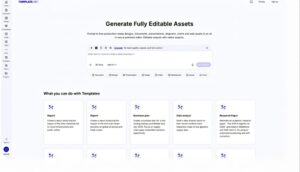
Key Features Found in Our Template.net AI Review
1. AI Production Engine for Structured Assets
The core of the platform is its ability to understand the hierarchy of a document. When you prompt for a “Quarterly Business Report,” the AI doesn’t just write text; it builds the layout, inserts charts, organizes social graphics, and structures the web assets with proper professional formatting.
2. Atomic Editing and Layered Outputs
Every result produced by the AI arrives as discrete layers. This “Atomic Editing” allows you to tweak a specific brand color, change a single data point in a chart, or rewrite a paragraph without having to rebuild the entire document from scratch. This flexibility is what makes it a true “production” tool rather than a mere “generator”.
3. Integrated Brand Kit and Data Sovereignty
Maintaining a consistent brand voice is a major challenge in 2026. Template.net solves this by allowing users to set central brand rules—logos, fonts, colors, and even “brand voice” profiles. Furthermore, user prompts and proprietary assets are not used to train external AI models, ensuring complete data control.
4. Extensive Export and Interoperability
One of the strongest points found in our Template.net AI Review is its native export capability. You can move your AI-generated work directly into:
-
Microsoft Office: PowerPoint (PPTX) and Word (DOCX).
-
Google Workspace: Docs, Sheets, and Slides.
-
Design Tools: Figma, SVG, and HTML5.
-
Cloud Storage: Google Drive, OneDrive, and Dropbox.
Who Should Use Template.net? (Industry Analysis)
Based on our research for this Template.net AI Review, the tool is a perfect fit for:
-
Startup Founders: Creating pitch decks and one-pagers for investors with on-brand AI assistance.
-
Marketing Teams: Generating multi-format campaign banners and social posts from a single prompt.
-
HR & Operations: Standardizing internal policies, checklists, and process documentation.
-
Educators: Designing lesson plans, worksheets, and training decks tailored to specific audiences.
-
Agencies: Using the platform as a fast “back-office” to deliver client reports and creative mockups at scale.
Template.net AI Review: Pros and Cons
The Pros:
-
Prompt-to-File Speed: Reduces hours of manual layout work into seconds of AI processing.
-
Truly Editable Content: No “flat image” walls; everything is customizable.
-
Format Coverage: Handles everything from business docs to video snippets in one interface.
-
Branding Support: Centralized Brand Kit keeps everything visually and tonally consistent.
The Cons:
-
Learning Curve: The sheer density of features and editors can be overwhelming for beginners.
-
Billing Perception: Public reviews often mention confusion regarding trial terms and renewal policies.
Pricing Plans (April 2026)
The platform offers two primary tiers designed to scale with your production needs.
| Feature | Plus Plan ($24/mo) | Max Plan ($94/mo) |
| Monthly Credits | 5,000 Credits | 50,000 Credits |
| Cloud Storage | 100 GB | 1 TB |
| Users | 1 User | Up to 10 Free Users |
| Templates | 1 Million+ Premium | 1 Million+ Premium |
Disclaimer: Always refer to the Official Template.net Website for the most accurate and current pricing details.
Aivora’s Verdict: How We Rated Template.net
Our team evaluated the platform based on real-world business requirements:
-
Accuracy & Reliability: 4.2/5
-
Ease of Use: 4.0/5
-
Functionality & Features: 4.6/5
-
Performance & Speed: 4.4/5
-
Overall Score: 4.2/5
Conclusion: Final Verdict on Template.net AI Review
To conclude our Template.net AI Review, the platform is a practical workhorse for any organization that lives inside Word, PowerPoint, or Google Workspace. It isn’t just an AI toy; it is a professional production hub that handles the heavy lifting of layout and design. If you are willing to spend a little time learning the interface, it can save your team dozens of hours every week. At Aivora, we consider it a must-have tool for structured, branded content creation in 2026. For more on cinematic AI tools, check our latest Kinovi AI Review 2026.
Related Posts

Epic Sora 2.0 vs Kling AI vs Luma Free Video Guide
Quick Summary: Video generation tech has evolved drastically in June…
Adcreative AI Review 2026: Brilliant Ad Generator Tool
Adcreative AI Review 2026 is the ultimate guide for digital…

Google Vids Review 2026: The Best AI Tool for Business
This Google Vids Review 2026 aims to show you how…