The generative AI revolution has officially reached the music industry. If you are a content creator, game developer, or agency looking for original, high-quality audio, you’ve likely heard of Suno AI. But while the tool is incredibly powerful, typing a basic sentence won’t always yield a Billboard-worthy hit.
The secret lies entirely in how you structure your Suno AI V3 prompts.
In this guide, I will break down the exact prompt formula to generate studio-quality tracks, explain the commercial copyright rules you need to know for YouTube, and share my own real-world testing experience.
The Secret Formula for Perfect Suno AI V3 Prompts
To get the best results from the V3 model, you cannot just type “make a sad song.” Suno AI relies on specific prompt engineering and “Meta Tags” to understand the structure of your track.
For the ultimate output, build your prompt using this framework: [Genre/Sub-genre] + [Vibe/Mood] + [Lead Instruments] + [Vocal Style]
Here are three advanced structuring tips for your lyrics box:
-
Use Structural Meta Tags: Always wrap your song parts in brackets. Use
[Intro],[Verse],[Chorus],[Bridge], and[Outro]. Suno’s AI engine is explicitly trained to recognize these cues. -
Control the Tempo: Add tags like
[Upbeat],[Slow Tempo], or[Drop]to force the AI to shift the energy of the track dynamically. -
Instrumental Solos: Want a guitar solo? Simply type
[Guitar Solo]between your verse and chorus to let the AI instruments shine.
My Real-World Test: The “Jawa Roadtrip” Track
As a tech reviewer, I don’t just read documentation; I test these tools in the real world. Recently, I wanted a highly specific, copyright-free track to listen to while taking my Jawa motorcycle out for a ride through the hills.
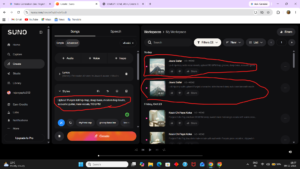
I needed an upbeat Punjabi lofi track with a modern bassline. Here is the exact Suno AI V3 prompt I used in the custom generation tab:
“Upbeat Punjabi lofi hip-hop, deep bass, modern trap beats, smooth acoustic guitar riffs, energetic male vocals, road trip vibe, 110 BPM.”
The result was mind-blowing. Within seconds, Suno V3 generated two distinct variations with flawless vocal clarity and a beat that perfectly matched the energy of a long motorcycle ride.
Can You Monetize Suno AI Music on YouTube? (Copyright Explained)
This is the most common question I see from the creator community: Can I use Suno AI music in my monetized YouTube videos or commercial podcasts?
The answer depends entirely on your subscription tier:
-
The Free Plan (Basic): You CANNOT use music generated on the free plan for commercial purposes. You do not own the copyright, and using it in monetized YouTube videos or Spotify can lead to copyright strikes.
-
Pro and Premier Plans: If you subscribe to a paid tier, you gain full commercial rights to the music you generate. You can use these tracks on YouTube, monetize them, use them in paid client advertisements, and even upload them to streaming platforms like Spotify or Apple Music.
“For the most up-to-date pricing and copyright rules, you can verify the details on the official Suno AI website.”
Note: If you cancel your paid subscription, you retain the commercial rights to all the tracks you generated while you were a paying subscriber.
Rajan’s Verdict: Is Suno V3 Worth It?
From a B2B and creator perspective, Suno AI V3 is a game-changer. It eliminates the need for expensive royalty-free music subscriptions (like Epidemic Sound or Artlist) and gives you the power to create hyper-specific audio for any project.Here is a quick behind-the-scenes look at my actual workspace where I spent time testing these different Suno V3 prompt variations for this review:

If you are currently exploring the limits of generative AI—much like when we recently set up a completely private local AI environment by [learning how to install Open WebUI on Windows] —Suno is a must-have tool in your modern AI stack. Just remember to upgrade to the Pro plan before you start uploading those tracks to your monetized channels!
Related Posts

DeerFlow 2.0 Review: Free AI to Bypass Claude
Quick Answer Welcome to this quick DeerFlow 2.0 Review! If…

ChatGPT Work Review 2026: Ultimate Agent Guide
Welcome to our definitive ChatGPT Work Review, where we explore…
Anijam AI Review 2026: Incredible AI Agent for Storytellers
Anijam AI Review 2026 is the only guide you need…